AI Product Photography for Fashion & Apparel Brands: From Flat-Lay to Model Shots
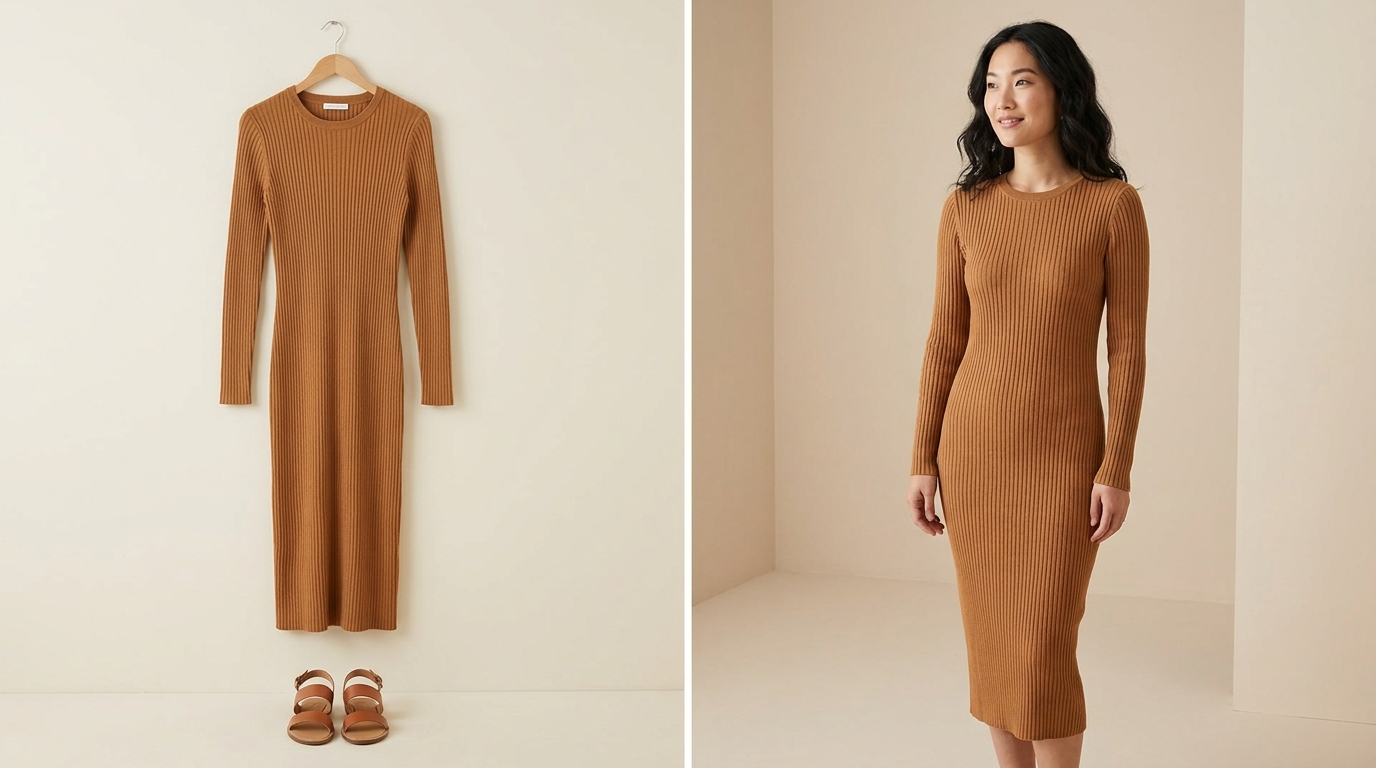
AI fashion photography turns a flat-lay, mannequin, or hanger photo of a garment into a realistic model shot — with a choice of body type, ethnicity, pose, and background — without booking a photographer or model.
Stocktree Team
The Fashion Seller's Problem: Cost, Diversity, and Turnaround
Fashion inventory turns over faster than almost any other e-commerce category. New drops, seasonal collections, and trend-driven restocks mean a constant need for fresh visuals — but a traditional model photoshoot doesn't scale at that pace. Booking a studio, hiring one or more models to represent different sizes and body types, and paying a photographer and stylist adds up quickly, and a single shoot day only covers what fits in that day.
Model diversity compounds the problem. A brand selling into Southeast Asia, the Middle East, and Western markets ideally needs model representation for each audience, which historically meant separate shoots or separate model bookings per region. AI fashion photography addresses both constraints at once: one garment photo can be rendered on multiple model types, in multiple settings, without additional shoot days or model fees.
How AI Fashion Photography Works
The underlying garment photo — a flat lay, a mannequin shot, or even a photo on an existing model — is used as the reference for fabric texture, cut, color, and print. The AI then generates a new image of a virtual model wearing that exact garment, adjusting pose, background, and lighting according to what's specified.
The quality bar for this has moved fast. Independent blind tests on standard commercial product images have found AI-generated results indistinguishable from real photography roughly 9 times out of 10 for typical use cases — draping, fabric behavior, and shadow physics are handled by specialized models trained specifically on clothing.

Model Diversity & Localization: Why It Matters for SEA and MENA Markets
For sellers targeting Indonesia, wider Southeast Asia, and eventually MENA markets, model representation isn't a cosmetic detail — it directly affects how well a shopper can picture themselves in the product. A listing photo featuring a model who visibly resembles the target customer tends to build more trust and relevance than a generic stock-style image. The same garment can be rendered across Asian, Middle Eastern, African, and Western model presentations — matched to gender, pose, and setting — without the cost of separate bookings for each market.
Pose, Lighting & Background Options by Selling Channel
A Simple Before/After Workflow
- Start with one clean flat-lay or mannequin photo of the garment, well-lit and shot straight-on.
- Select the model attributes — body type, ethnicity, and pose — appropriate to the target market and channel.
- Choose the background — studio for listings, lifestyle for ads and social.
- Generate multiple variations and select the strongest result, or regenerate with adjusted direction.
- Export sized versions for each channel: marketplace listing, Instagram post, ad creative.
Common Mistakes When Using AI Fashion Photography
- Over-editing the output — pushing lighting or skin retouching to the point where the model looks artificial, which can undermine buyer trust.
- Inconsistent style across a collection — mixing studio and lifestyle backgrounds randomly instead of keeping a consistent visual language per collection.
- Ignoring fabric-specific detail — sheer, textured, or heavily patterned fabrics sometimes need a second look to confirm the AI rendered the material accurately before publishing.
- Skipping the compliance shot — using only lifestyle images and forgetting the plain-background image most marketplaces require for the primary listing photo.
Frequently Asked Questions
Q1. Can AI generate model photos from a photo of clothing on a hanger, not just flat-lay?
Yes. Mannequin, hanger, and flat-lay photos all work as reference inputs, though a flat, well-lit, front-facing shot generally produces the most accurate draping and proportions.
Q2. Will the fabric texture and print look accurate on the AI model?
Modern fashion-specific AI models are trained to preserve fabric texture, color, and print detail from the reference photo. It's still good practice to review generated images for fine-pattern accuracy before publishing.
Q3. Can I generate the same garment on models of different body types?
Yes — this is one of the main advantages over a traditional shoot, where body-type range is limited to whichever models were booked for the day.
Q4. Is this suitable for UGC-style content, not just polished studio shots?
Yes. Choosing a casual pose, natural lighting, and an everyday setting produces results that read as authentic UGC rather than a produced studio shot.
Q5. Do I still need a real photoshoot at all?
Most sellers use AI for the bulk of catalog and ad imagery, while reserving real photoshoots for flagship campaigns, brand hero content, or cases requiring very specific art direction.