AI Product Photography for E-Commerce: The Complete 2026 Guide
AI product photography uses generative AI to turn a single product photo into studio shots, lifestyle scenes, or model images — without a physical photoshoot
Stocktree Team
What Is AI Product Photography?
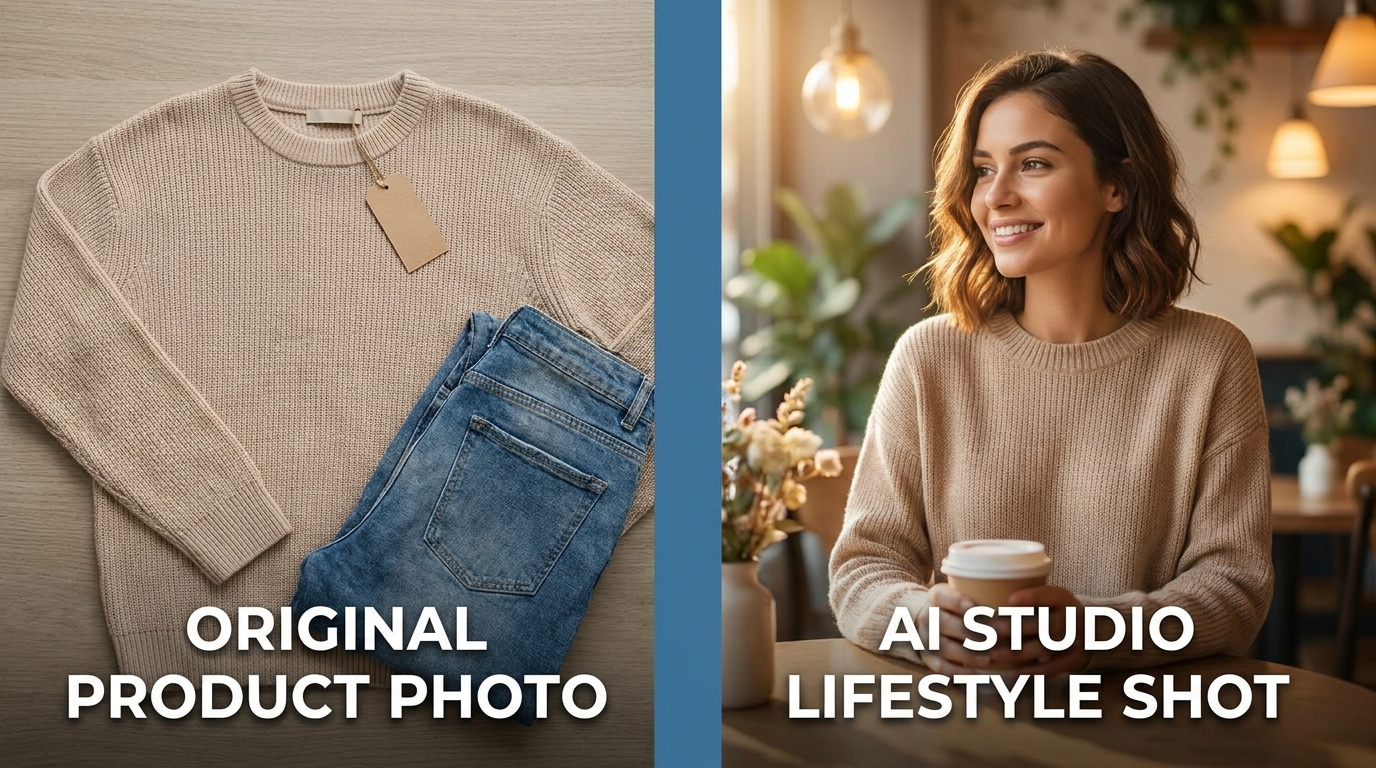
AI product photography is the process of using generative AI models to create or enhance product visuals from a starting image, rather than shooting every scene with a camera and a studio setup. A seller uploads one photo of a garment, a bottle of serum, or a kitchen appliance, and the AI generates new backgrounds, lighting, model shots, or lifestyle scenes around it.
This is different from basic photo editing. Editing tools like crop, color-correct, or background-blur work with what is already in the frame. AI product photography generates new pixels — a studio backdrop that never existed, a model who never wore the garment, a kitchen that never held the appliance — while keeping the actual product accurate to the source photo.
Most modern platforms treat the original photo as a transformation input rather than a final asset. A single reference image can be turned into dozens of outputs: white-background packshots for marketplace compliance, lifestyle scenes for social ads, and model photography for fashion listings — all from one upload.

Why Sellers Are Switching to AI in 2026
The shift is driven by cost, speed, and scale rather than novelty. A traditional product photoshoot — studio rental, photographer, stylist, and models — can easily run from a few hundred to several thousand US dollars per session, plus days of turnaround before assets are ready to publish. AI generation compresses that into a workflow that can produce comparable results in minutes, at a fraction of the cost.
The adoption data backs this up. Retail companies collectively spent close to $20 billion on AI tooling in 2023, the second-highest spend of any industry after banking, according to figures reported by Statista. On the creative side, a large share of marketers — north of 60% in recent surveys from Salesforce and HubSpot — say they have already integrated AI into daily content workflows, and image generation is one of the fastest-growing use cases.
For sellers specifically, the pressure point is catalog velocity. A store adding new SKUs every week cannot realistically book a new photoshoot for each drop. AI product photography turns visual production into something that scales with the catalog instead of bottlenecking it.
Traditional Photoshoot vs. AI Generation: Cost & Time
How AI Product Photography Works
Most platforms follow the same basic pipeline, even if the interface differs:
- Upload a reference photo. This can be a simple phone photo, a flat lay, or an existing catalog image — the AI uses it to understand the product's shape, color, and material.
- Choose an output style. Studio white-background, lifestyle scene, or a model wearing/using the product, depending on the category.
- Set the context. Background setting, lighting mood, model attributes (for fashion and beauty), or room type (for electronics and appliances).
- Generate and review. The AI produces one or more variations; sellers pick the best result or regenerate with adjusted direction.
- Export for each channel. Marketplace-compliant packshots, social-ready crops, and ad creative sized for each platform.
Key Use Cases by Industry
- Fashion & apparel — turning flat-lay or mannequin photos into diverse model shots across body types, ethnicities, and poses, without booking a new model for every collection drop.
- Cosmetics & beauty — generating skin-tone-diverse model shots, texture and swatch close-ups, and mood-driven lifestyle backgrounds that match a brand's visual identity.
- Electronics — clean studio packshots for spec-focused listings, plus in-room lifestyle scenes that help buyers judge scale and context before purchase.
- Home appliances — placing products in the correct room setting — a blender in a kitchen, a hair dryer in a bathroom — so buyers immediately understand where and how the product is used.
What to Look for in an AI Product Photography Tool
Not all AI photo tools solve the same problem. Before committing to a platform, sellers should check for:
- Model and background diversity — a wide enough range of ethnicities, settings, and styles for your actual target market, not just a generic Western default.
- Batch and catalog workflows — the ability to process dozens or hundreds of SKUs at once, not just one-off manual jobs.
- Category-appropriate context — understanding that a skincare bottle belongs in a bathroom scene and a blender belongs in a kitchen.
- Marketplace-ready output — pure white backgrounds and correct aspect ratios for the marketplaces you actually sell on (Shopee, Tokopedia, Amazon, TikTok Shop, etc.).
- Licensing-safe inputs — stock photography sourced through a proper licensed API rather than bulk-scraped from free stock sites — a real legal risk if skipped.
- Result-oriented delivery — finished, ready-to-publish listing images, not just another blank editing canvas.
How Stocktree Approaches AI Product Photography
Stocktree is built around a result-first model: instead of handing sellers a blank canvas and a prompt box, it offers Generation-as-a-Service (GaaS) — done-for-you result packs for Listings, Campaigns, and Catalogs across fashion, cosmetics, electronics, and home appliances. The platform is built for e-commerce sellers, marketers, agencies, and UGC creators who need finished, marketplace-ready visuals rather than another design tool to learn. Free, Pro, and Expert/Business plans give sellers a path from testing the platform to running full campaign-scale generation, with localization built for Indonesia and Southeast Asia first.
Frequently Asked Questions
Q1. Is AI product photography good enough to replace a real photoshoot?
For most e-commerce listing and social content needs — packshots, lifestyle scenes, and model shots — modern AI output is close to indistinguishable from a professional photo in blind comparisons. Complex commercial shoots with very specific art direction may still benefit from a human photographer, but for catalog-scale product imagery, AI is now a practical primary option rather than a fallback.
Q2. Do I need professional photography equipment to start?
No. Most AI product photography tools work from a single phone photo of the product, as long as the item, colors, and shape are clearly visible and well-lit.
Q3. Is it legal to use AI-generated product photos on marketplaces?
Yes, as long as the images accurately represent the product and don't misrepresent size, color, or included items. Most marketplaces care about accuracy, not how the image was produced.
Q4. How is this different from a background remover?
A background remover only isolates the existing subject from its backdrop. AI product photography goes further — it can generate entirely new backgrounds, lifestyle scenes, or model shots around the product, not just cut it out.
Q5. Which industries benefit most from AI product photography?
Fashion, cosmetics and beauty, electronics, and home appliances see the fastest returns because these categories need frequent visual refreshes, model or context variety, and high SKU turnover — all areas where traditional photoshoots are slow and expensive to scale.